
I’m still learning about photo editing, but I wanted to share a couple apps that are super easy to help enhance your photos. I’m not a photography blogger (in the slightest), but I felt like this is something relevant to my motherhood because I’m pretty sure most moms take hundreds or perhaps thousands of pictures. So my top four favorite apps and how I use them. I did them in order of easy to difficult.
Snapseed
I use Snapseed if I’m in a hurry and want to lighten/brighten and add a little contrast to a picture. It’s also nice for enhancing certain tones in a picture or smoothing the horrors of the cell phone front camera. For a quick tutorial on Snapseed, check out my blog post about it.
Retouch
There are a few features in retouch, but I have only used them to get rid of background I don’t want in the picture. I use this app very rarely, but it’s great when I need it. Retouch does a better job of blending/healing than other apps, especially free ones. It costs $1.99, but it works so well it’s worth it. No ads and the interface is easy for novices.

VSCO
I use the VSCO app so much I have a “recipe” for my edits to my preference based on the lighting in our house. VSCO is free but has add one extras that cost money. The basic features are all I need from the app. I use it to adjust exposure and contrast and balance the white balance (tint and temperature). Adjusting the white balance is the blues, pinks, yellows, and greens in the picture. I always take it a step further and use my last favorite app to completely flush out an image, but sometimes VSCO does the trick.

Adobe Lightroom CC
I prefer the fixing the exposure to pictures on VSCO and White Balance, but for final touches like light adjustments (shadows, highlights), vibrancy, saturation, and possible color adjustments I use Lightroom. You can see the subtle differences below.
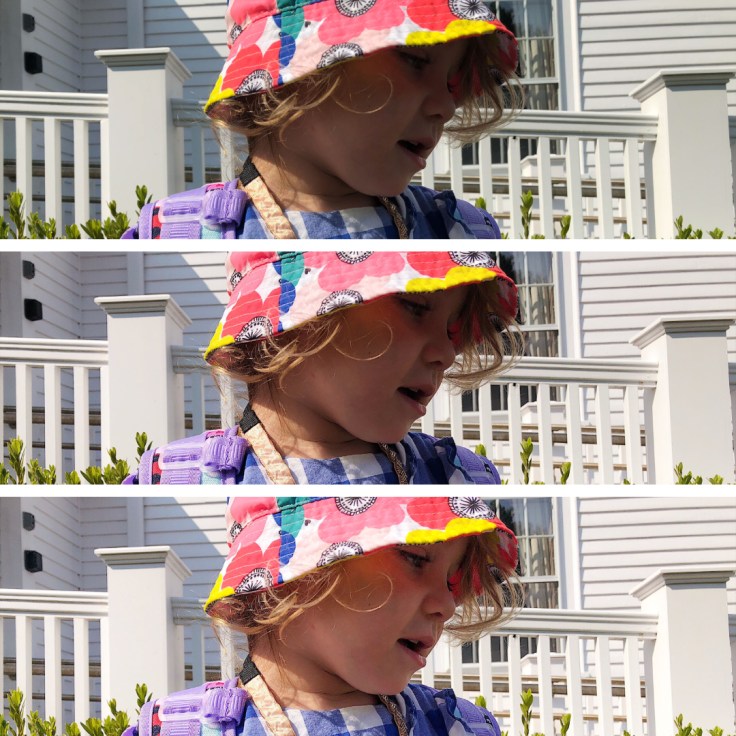
Hope this inspired you a little to try out some or all of these apps. I always try to keep my images natural looking. There’s no wrong way to edit, play around and edit the way you love it. Over the rest of the summer I’ll do some follow up posts with a couple walk throughs for using the apps. Stay tuned!
 My Peanut Adventures